Borrowed Time: The Hidden Lifecycle Crisis Threatening Your External Hard Drive
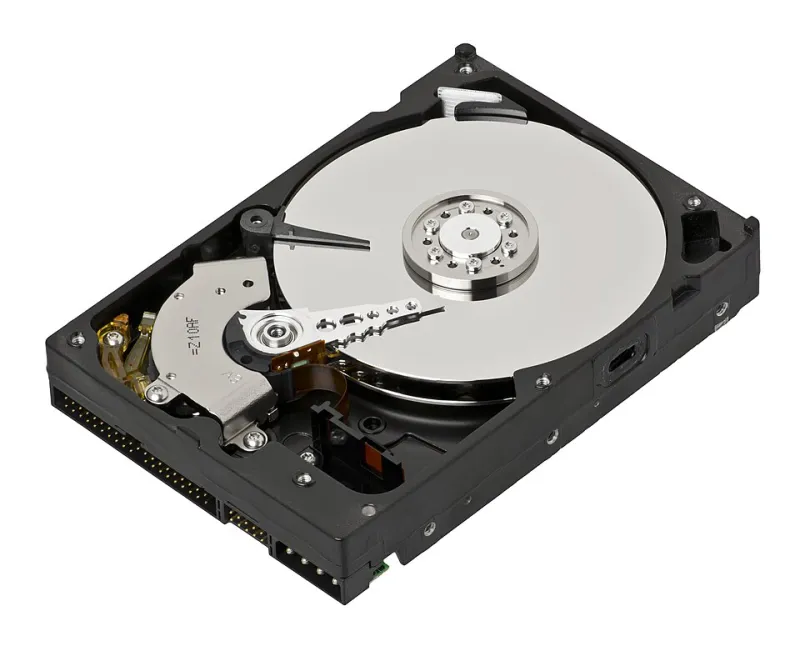
Photo: Evan-Amos, CC BY-SA 3.0, via Wikimedia Commons
There is a reasonable assumption embedded in the way most people use external hard drives: that the device sitting in a desk drawer, on a shelf, or tucked into a laptop bag is reliably preserving whatever data was placed on it. That assumption is frequently wrong — and the consequences of discovering this at the wrong moment can be severe.
External hard drives are among the most widely owned storage devices in the United States, yet they are also among the most misunderstood in terms of actual durability. The gap between perceived reliability and documented failure rates is significant, and it costs individuals and businesses meaningful amounts of data every year.
What the Manufacturers Are Not Emphasizing
Most external hard drives sold to consumers in the U.S. market carry a limited warranty of one to three years. That warranty window is not arbitrary. It reflects, in part, what manufacturers understand about the statistical lifespan of their own components.
The mechanical hard drive platters, read/write heads, and spindle motors inside most external enclosures are subject to a well-documented failure curve known in engineering circles as the "bathtub curve." This model describes three phases: an early failure period driven by manufacturing defects, a relatively stable middle period, and a wear-out phase in which failure rates climb sharply. For consumer-grade external drives, that wear-out phase frequently begins between three and five years of use — sometimes earlier under adverse conditions.
Solid-state external drives carry different failure characteristics. They do not suffer from mechanical wear in the same way, but they are subject to NAND flash cell degradation, which becomes increasingly relevant after a finite number of write cycles. Drives used for frequent backups or continuous file transfers can approach that threshold faster than users anticipate.
Environmental Factors That Accelerate Deterioration
The physical environment in which a drive is stored and operated has a measurable impact on its functional lifespan. Several factors deserve specific attention.
Heat is among the most damaging variables for both mechanical and solid-state drives. A drive stored in a car during summer months in states like Arizona or Texas can experience internal temperatures well beyond safe operating ranges. Even consistent exposure to ambient temperatures above 95°F can meaningfully shorten a drive's useful life.
Humidity and condensation present a different category of risk. A drive moved from a cold environment — such as a car in winter — into a warm indoor space can experience condensation on its internal components. Powering on a drive in this condition risks short-circuiting the controller board or corrupting data on the platters.
Physical shock and vibration remain the most common cause of sudden mechanical failure in traditional hard drives. The read/write heads in a spinning drive float nanometers above the platter surface during operation. A single drop from desk height while the drive is running can cause a head crash — a catastrophic contact between the head and the platter that typically renders data unrecoverable without professional intervention.
Electromagnetic interference is a less frequently discussed but genuine concern. Storing drives near speakers, motors, or other magnetic field sources over extended periods can gradually corrupt magnetically stored data.
Usage Patterns That Shorten Lifespan
Beyond environment, how a drive is used has a direct bearing on how long it will remain reliable.
Frequent connection and disconnection cycles stress the USB interface and the internal connector. Drives that are plugged and unplugged multiple times daily accumulate wear on these components at a rate that stationary drives do not. Similarly, drives that are regularly transported — in backpacks, briefcases, or luggage — are subject to ongoing low-level vibration and occasional impact that compounds over time.
Partial backups and fragmented file systems can also contribute to accelerated wear on mechanical drives. When a drive is forced to perform excessive read/write operations across scattered sectors, the mechanical components work harder and accumulate wear more rapidly.
One pattern that catches many users off guard is long-term storage without periodic operation. Drives left unused for one to two years or more can experience lubricant degradation in the spindle motor, making startup difficult or impossible. The stored data may be intact on the platters, but the drive may lack the mechanical capacity to read it.
Monitoring Device Health Before Crisis Strikes
The good news is that most mechanical hard drives provide advance warning of impending failure — if users know where to look.
SMART (Self-Monitoring, Analysis, and Reporting Technology) is a diagnostic framework built into virtually every hard drive manufactured in the past two decades. Free utilities such as CrystalDiskInfo (Windows) and DriveDx (macOS) can query a drive's SMART data and surface warning indicators including reallocated sector counts, spin retry counts, and uncorrectable error rates. Any SMART attribute flagged as "caution" or "bad" should be treated as an urgent signal to back up data and replace the device immediately.
For solid-state external drives, similar tools can report on wear leveling counts and available spare blocks, providing a rough estimate of remaining write capacity.
Beyond software monitoring, users should pay attention to behavioral changes in their drives. Unusual clicking or grinding sounds from a mechanical drive are among the most serious warning signs possible — they typically indicate head or platter damage and warrant immediate cessation of use. Slower-than-normal transfer speeds, repeated disconnections, and drives that fail to mount consistently are all indicators that professional evaluation may be warranted.
Establishing a Realistic Replacement Schedule
Given the failure data available, treating external hard drives as indefinite storage solutions is a strategic error. A more defensible approach involves establishing a deliberate replacement cycle.
For drives used as primary or sole backups, a three-year replacement cycle is a reasonable baseline for consumer-grade mechanical drives under normal conditions. Drives used in high-heat or high-vibration environments should be evaluated more frequently. Solid-state external drives used primarily for archival storage — with minimal ongoing write activity — may remain reliable for longer, but should still be verified periodically.
Regardless of drive age, no external hard drive should serve as the only copy of important data. The 3-2-1 backup principle — three copies of data, on two different media types, with one copy stored offsite — remains the most practical framework for protecting against device failure.
When Failure Has Already Occurred
If an external drive has stopped responding, is making abnormal sounds, or is no longer recognized by a computer, the most important immediate action is to stop attempting to use it. Continued operation of a failing mechanical drive can compound physical damage and reduce the probability of successful data recovery.
Professional data recovery services have specialized tools and cleanroom environments capable of recovering data from drives that have experienced head crashes, platter damage, or electronic failure. These services are not inexpensive, but they represent the most viable path to data retrieval when a drive has failed beyond the reach of software-based tools.
The external hard drive in your desk drawer may feel like a reliable safeguard. Understanding what it is actually capable of — and what it is not — is the first step toward building a data protection strategy that holds up when it matters most.